

Changing jobs, moving house, updating contact details or juggling several accounts can leave your super hard to track down, which is why a lost superannuation search can help locate old accounts.
Across Australia, the Australian Taxation Office (ATO) says $16 billion of super is held in accounts classed as lost or unclaimed. If you’ve lost super, some of that money could belong to you.
how to find lost superannuation australia without paying a search fee.
How to Do a Free Lost Superannuation Search
Lost super can be checked through the ATO at no cost whenever needed.
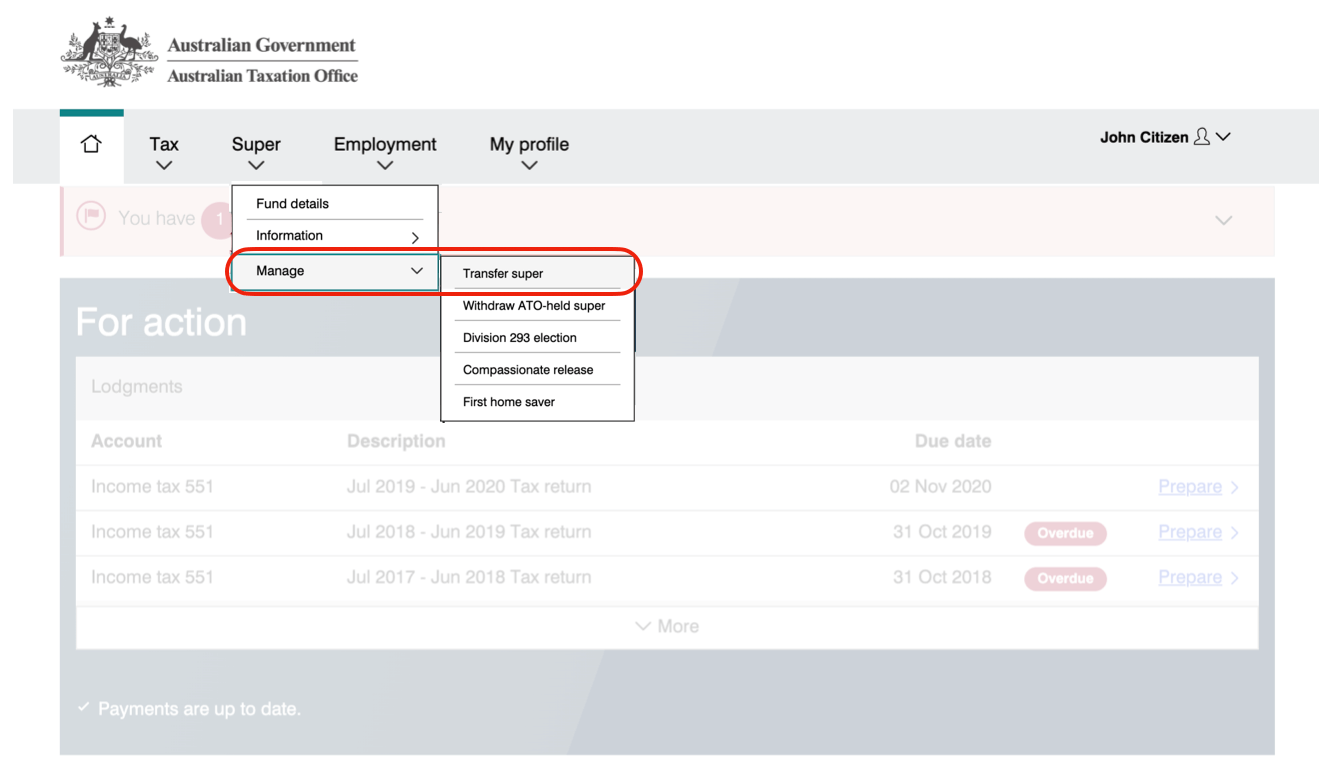
A search costs nothing. To confirm where is my superannuation, check any unclaimed amount shown if super is held in your name. Sign in to myGov, go to Super, pick the account you want to keep, then move that balance.
In myGov, head to the Super management area, check the unclaimed balance available, then bring it into the active account you’ve chosen. That’s where you make the transfer.
How to find lost superannuation Australia
Phone and post searches are available too. Rather than going through myGov, call the ATO on 13 28 65, or download and send in a paper form from its website to seek lost or unclaimed super.
Using myGov as a Superannuation Finder
An unlinked myGov account needs connecting to the Australian Taxation Office (ATO) before searching:
- Open your myGov account: Visit the myGov website and log in.
- Connect the ATO service: If you have not connected it already, link your myGov profile with the Australian Taxation Office (ATO). Personal information, including your Tax File Number (TFN), may be required.
- Enter the super area: After linking the ATO, choose it from the services shown in myGov. On the ATO online home page, choose the Super option in the upper menu.
- Check the accounts shown: The Super area shows accounts recorded in your name, including ‘lost’ accounts held by super funds and ‘unclaimed’ super retained by the ATO.
Once you’ve seen the results, choose the balances to move and the accounts to keep.
Calling the ATO Directly
Would you prefer to use the phone? Call the ATO on 13 28 65 to ask directly about any lost or unclaimed super.
The ATO will check who you are before it searches. Keep your Tax File Number (TFN) ready when you call. An identity document may be required, so give details from a driver licence, Medicare card, or passport. Enrol in the ATO’s voice authentication service for quicker later checks on calls.
Using a Paper Form for Your Superannuation Search
For example, a paper form from the ATO website can be used to ask for lost or unclaimed super.
Use the 256KB PDF document titled “Searching for lost and unclaimed super” (NAT 2476). Fill it in, then post it to the Australian Taxation Office at PO Box 3578, Albury NSW 2640. For help, call the superannuation enquiries line on 13 10 20.
The total held in these balances has moved over time. As of 30 June 2025, the Australian Taxation Office (ATO) held just over $18.9 billion of lost and unclaimed super across just under 7.3 million accounts. Some could be in your name.
Critical Checks Before You Consolidate
Consolidating several super accounts can involve costs and losses, so take time to check both before deciding whether to proceed.
Seek a super financial advisor before making changes to your super.
Check Your Insurance Cover
Closing a super account during consolidation can cancel its insurance, so look at what each fund includes before proceeding: Death, Total and Permanent Disablement or TPD, and Income Protection.
Insurance can vary widely between super funds, so moving your balance may leave you with cover that no longer properly fits your circumstances at all.
A replacement policy may not match or improve your existing cover. If your health has changed, getting that level of protection later may not be possible. Once you close the account, its insurance is gone for good.
Premiums tell only part of the story. Compare the actual cover against these points:
- Cover category: Check whether each fund provides Death, Total and Permanent Disablement (TPD), and Income Protection.
- Insured amount: Compare the dollar value of protection under each category.
- Policy wording: Check how each policy describes ‘Total and Permanent Disablement’, as different definitions can affect whether a claim succeeds.
- Waiting and payment periods: For Income Protection, compare how long you must be unable to work before claiming and how long benefits can continue.
- Exclusions: Identify situations or pre-existing conditions that a policy leaves outside its cover.
Inform Your Employer of the New Account
If your chosen account isn’t where your employer currently sends contributions, give your employer the new fund details.

To update this officially, use the ATO’s Superannuation standard choice form (NAT 13080). You can fill it in online or print it. Have your employer’s Australian Business Number (ABN) ready, plus the Unique Superannuation Identifier (USI) for the super fund your employer uses by default. Some payroll software lets you enter the same details another way.
Sending these details stops future super contributions going into an unsuitable account.
Compare Fees and Costs
Exit fees have disappeared at many super funds. Still, before you approve a consolidation, check whether the transfer itself carries a fee at all. Compare any small, one-off cost against the ongoing saving you make when you no longer pay administration fees across several accounts each year.
Contact the relevant fund before consolidating, and check whether it charges any transfer fees.
How to Consolidate Your Super Accounts
A preferred super fund can help combine accounts. Anyone not wishing to handle the process can ask the fund what help it offers and which details it needs before it can begin.
The suitable route depends on the desired level of involvement. With myGov, the process is handled online through government services. For help with forms and checking details, a chosen fund may be a better fit.
Consolidating via myGov and the ATO
After finding all super accounts, use myGov to combine balances in a ‘rollover’. Open Manage, then the transfer function. Completion can take a few days.
- Open the transfer function: Sign in to myGov, enter the ATO service (in myGov), choose Super, open Manage, then select Transfer super.
- Choose the accounts involved: A list of your super accounts will appear. Mark the accounts you want to close and move money *from*, then nominate the account that should receive the funds.
- Check and approve the rollover: Check the transfer details, including the balances that will move. When you approve the request, the ATO contacts the relevant funds and arranges the movement of your money. Completion can take a few days.
The transfer area lists the accounts. Check each one, then choose which balances move into the selected account.
Using Your Chosen Super Fund to Help
A chosen super fund can arrange the consolidation. For those preferring to stay out of myGov, it may deal with much of the administrative work. Generally, the following steps must first be completed.
- Speak with the fund: Tell your chosen fund that you want your other super accounts combined with the account you hold there.
- Sign an authority: The fund will usually ask you to complete a ‘Rollover form’ or a similar document. This lets it search for super in your name and request funds held by other super funds and the ATO.
- Give the fund your information: Provide the personal details it needs, including your Tax File Number (TFN), so it can identify and locate your other accounts.
Lost super can still be brought back together with a lost superannuation search. Search the ATO first, check the accounts and any transfer fees, then decide where the money should go. myGov leaves the account holder in charge of the transfer, while a chosen fund may do much of the administrative work after the authority is signed. Either route ends with one chosen account.
Explore More Topics: